If you’ve ever used the default Recent Posts widget in WordPress, you know the problem, it’s a bit plain. Just a list of post titles with no images, which can make your sidebar look kind of empty or at least a little boring.
I ran into this on a client site recently. I need thumbnails in the Recent Posts widget, but installing another plugin felt like overkill. Luckily, the client was using GeneratePress, and I knew I could fix it with a Hook element. Here’s how I did it:
1. Set Up the GeneratePress Hook
Create a new GeneratePress Elements, I called mine Widget Recent Posts
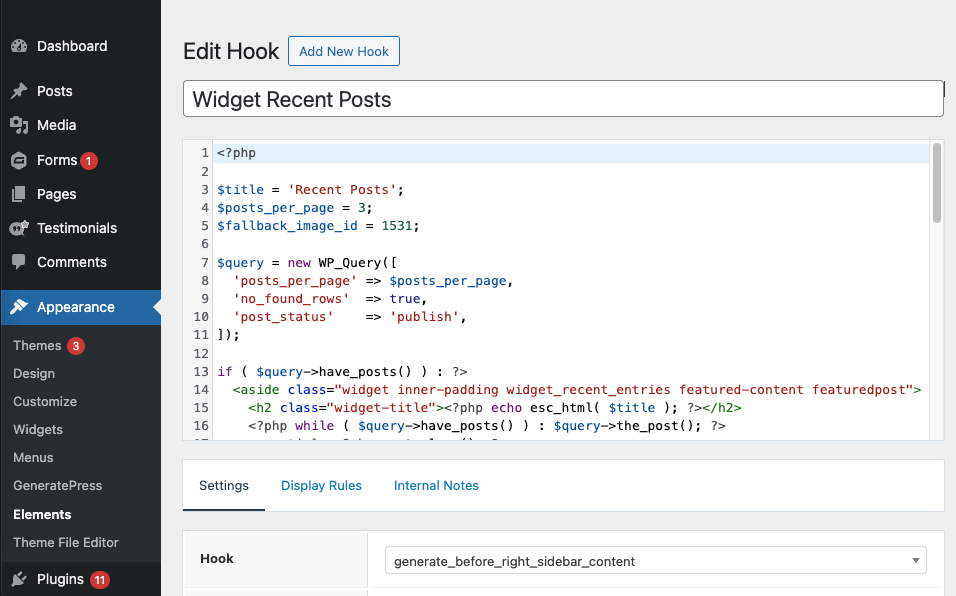
- Hook:
generate_before_right_sidebar_content - Execute PHP: Yes
- Priority: 10
- Display Rules: Entire site
This makes sure your recent posts list shows before the right sidebar.
Note: This only works if you’re using GeneratePress with GP Premium.
2. Add the PHP Code
Add this PHP code in your hook element:
<?php
// Widget configuration
$title = 'Recent Posts';
$posts_per_page = 3;
$fallback_image_id = 1531; // Media Library image for fallback

// Query latest posts
$query = new WP_Query([
  'posts_per_page' => $posts_per_page,
  'no_found_rows'  => true,
  'post_status'    => 'publish',
]);

if ($query->have_posts()) : ?>
  <aside class="widget inner-padding widget_recent_entries featured-content featuredpost">
    <h2 class="widget-title"><?php echo esc_html($title); ?></h2>

    <?php while ($query->have_posts()) : $query->the_post(); ?>
      <article <?php post_class(); ?>>
        <!-- Featured image or fallback -->
        <figure class="entry-image">
          <a href="<?php the_permalink(); ?>">
            <?php
            if (has_post_thumbnail()) {
              the_post_thumbnail('thumbnail', [
                'loading' => 'lazy',
                'alt' => get_the_title()
              ]);
            } else {
              echo wp_get_attachment_image($fallback_image_id, 'thumbnail', false, [
                'alt' => get_the_title(),
                'loading' => 'lazy'
              ]);
            }
            ?>
          </a>
        </figure>

        <!-- Post title and date -->
        <header class="entry-header">
          <h4 class="entry-title">
            <a class="title" href="<?php the_permalink(); ?>"><?php the_title(); ?></a>
          </h4>
          <p class="entry-meta"><?php the_time('M d, Y'); ?></p>
        </header>
      </article>
    <?php endwhile; ?>
  </aside>
<?php
wp_reset_postdata();
endif;
?>
Here’s what it does:
- Checks if a post has a featured image.
- If it does, it shows the featured image. If not, it shows a fallback image.
To use your own fallback image, just replace $fallback_image_id = 1531; with your image ID. You can find it in the Media Library by selecting the image and checking the URL in your browser — it’ll look like: http://example.com/wp-admin/upload.php?item=1531
You can also tweak:
$title— the widget title$posts_per_page— how many posts to show
The code also uses post_class(), which automatically adds helpful classes for styling (categories, tags, post type, etc.).
3. Style With CSS
To make it look nice in the sidebar, I used a simple flexbox layout that puts the image on the left and content on the right. Add this CSS to your child theme or Appearance → Customize → Additional CSS:
.featured-content .hentry {
  display: flex;
  gap: 1rem;
  margin-bottom: 1.5rem;
}

.featured-content .entry-image {
  flex: 1;
}

.featured-content .entry-header {
  flex: 2;
}

.featured-content .entry-title {
  font-size: 1rem;
  line-height: 1.2;
}
4. Why This Works
- Shows featured images (or a fallback) for every post.
- Lightweight — no extra plugins.
- Flexible and easy to customize.
- Uses
post_class()so styling is simple.
5. Final Thoughts
If you’re using GeneratePress + GP Premium, this little hook saves you from installing another plugin. It’s clean, lightweight, and keeps your sidebar looking great.
Need help customizing your WordPress site with hooks, widgets, or layouts? That’s exactly what I do — get in touch, and I’ll help you out.